Channel Overview
Channels are the communication mediums through which customers reach your support team. Each channel represents a configured connection – email, web chat, Slack, and more – that funnels inbound messages into Auxilium conversations and lets agents reply through the same medium.
Every channel is project-scoped: it belongs to exactly one project and only surfaces conversations within that project. This lets you run separate support operations (different brands, products, or teams) with isolated channel configurations.
The Channels page
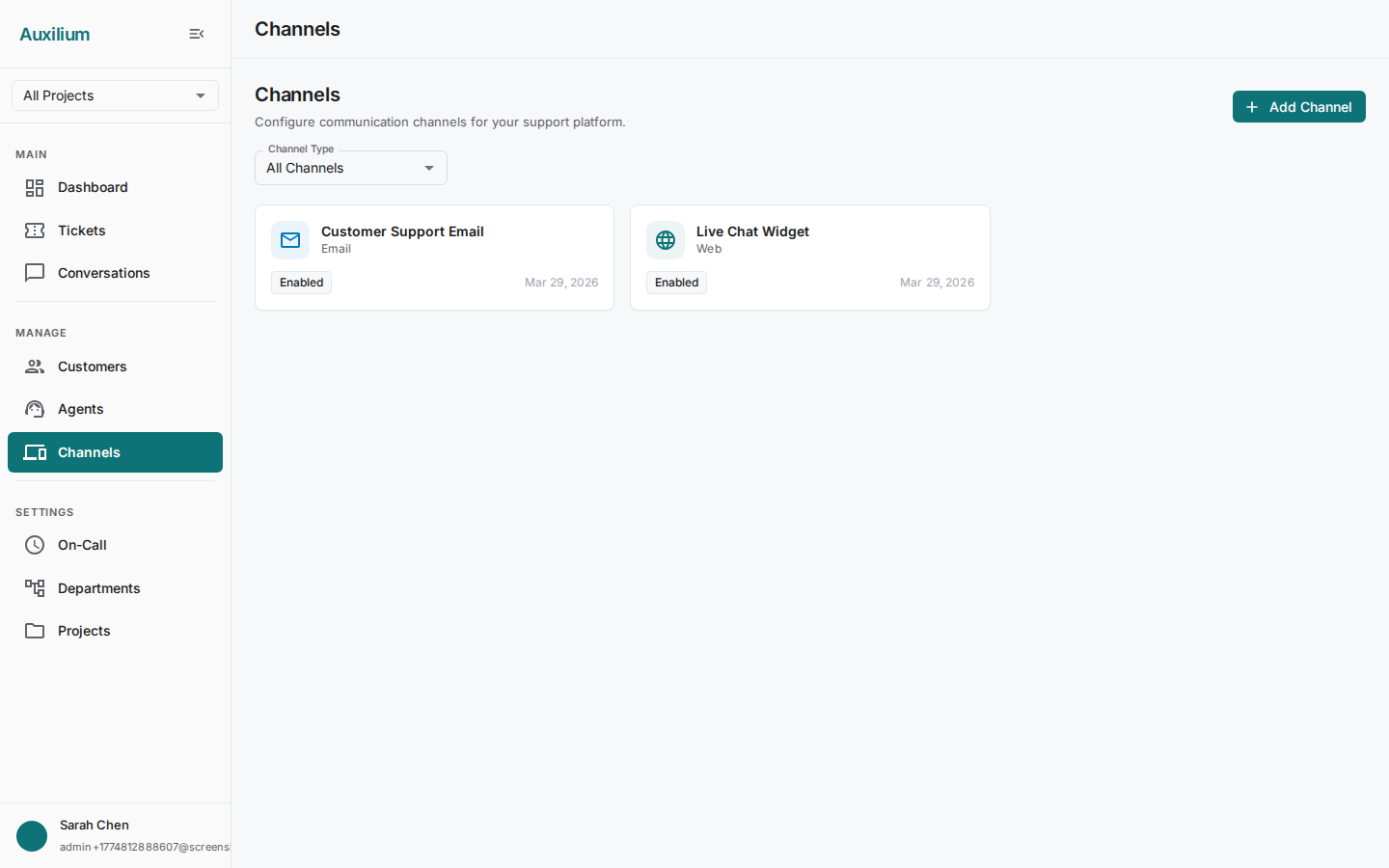
To view your channels, navigate to Channels in the sidebar. The page displays a header with the title “Channels” and an Add Channel button in the top-right corner.
Channel cards
Channels are displayed in a three-column grid of cards. Each card shows:
- Channel type icon with a color-coded background indicating the channel type
- Name – the human-readable name you assigned when creating the channel
- Type – the channel type (e.g., Email, Web, Slack)
- Description – a short description of the channel
- Status chip – either Enabled (green) or Disabled (gray), showing whether the channel is actively processing messages
- Created date – when the channel was first created
- Edit and Delete buttons at the bottom of each card
Filtering by type
Above the grid, a Channel Type dropdown lets you filter the displayed cards. Options include:
- All Channels
- Web
- Slack
- Teams
- Telegram
- Apple Messages
Select a type to narrow the grid to only channels of that kind. Select All Channels to see everything again.
Supported channel types
| Channel type | Description |
|---|---|
| Full bidirectional email via IMAP (inbound) and SMTP (outbound). The most common channel for traditional support workflows. | |
| Web | In-app web chat embedded in your customer portal or website for real-time conversations. |
| Slack | Direct integration with Slack workspaces. Customers message a Slack channel or bot; agents respond from Auxilium. |
| Microsoft Teams | Teams channel integration for organizations that use Microsoft 365. |
| WhatsApp Business API integration for messaging customers on WhatsApp. | |
| Telegram | Telegram bot integration. Customers message your bot; conversations appear in Auxilium. |
| Apple Messages | iMessage for Business, allowing customers on Apple devices to reach support natively. |
Next steps
- Email (IMAP/SMTP) – Set up bidirectional email support, the most common channel type.
- Web Chat – Create a web chat channel for real-time customer conversations.
- Managing Channels – Edit, enable/disable, and delete channels.